
Your DeepSeek chats, organized
Give each project a folder. Keep your best prompts ready. Save the replies you want to come back to, all inside DeepSeek.
Free and open source. For chat.deepseek.com in desktop Chrome.
950+ users · 4.7★
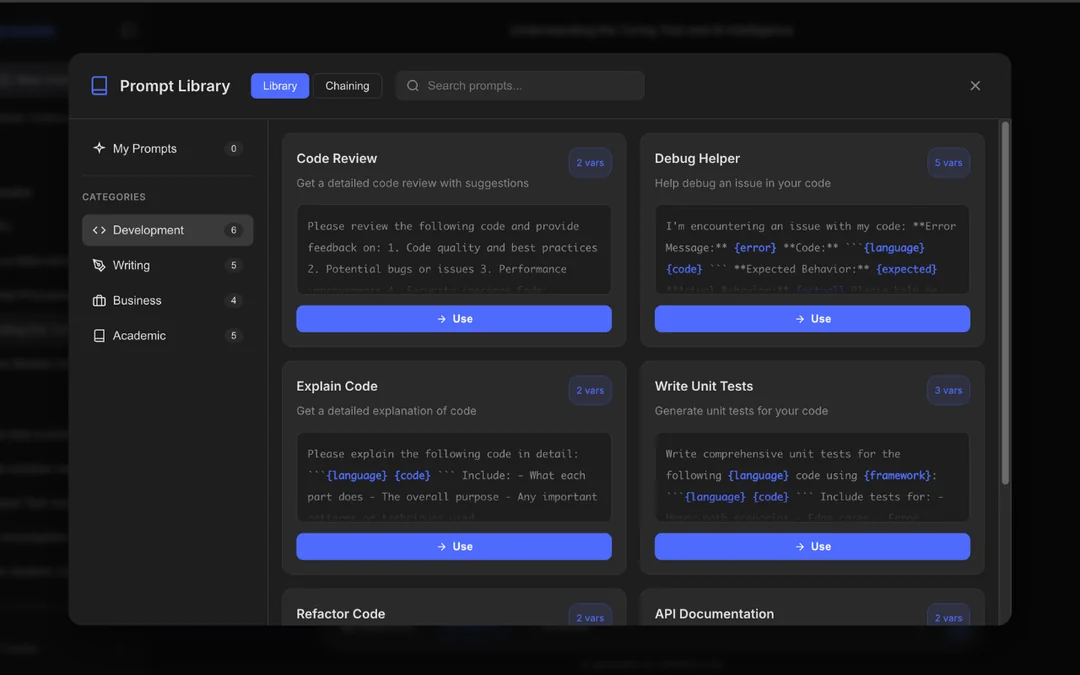
Less searching. More useful conversations.
Folders for each project
Group related conversations so your research, work and everyday questions have their own place.
Prompts you can reuse
Keep instructions in a prompt library. Use prompt chains for workflows that need a sequence of requests.
Pin useful replies
Bookmark an answer or code snippet so you can find it again without scrolling through the whole conversation.
Export your conversations
Save loaded messages as Markdown, JSON, text or HTML, or open a PDF print view. Review long chats before exporting: unloaded messages may be missing.
Need to tidy up? Select multiple conversations and review the selection before confirming bulk deletion.
Start with one folder or one saved prompt
- Install DeepSeek Folders, Prompt Library & Export from the Chrome Web Store. This is the store name for DeepSeek Toolbox.
- Open DeepSeek Chat and sign in to your DeepSeek account. Refresh an already-open tab after installation.
- Find DS-Toolbox in the sidebar. Create a folder for your project or open the prompt library to save a reusable instruction.
No DeepSeek API key is needed for these web-interface tools.
Before you install
Is DeepSeek Toolbox free?
The current tools are free, and the extension source is available under the GPL-3.0 license. You still use your own DeepSeek account.
Where are my folders and prompts stored?
Folders, bookmarks, prompts, chains and settings are stored in your browser profile. They are not cloud-synced. Removing the extension can remove this saved data.
What does the optional AI prompt enhancer send?
When you click Enhance, your selected draft is sent to a hosted AI service. This is separate from DeepSeek’s API. You can hide Enhance in Settings and use the organization tools without it. The extension also checks membership using an installation ID. Read the data-handling details.
Is this made by DeepSeek?
No. DeepSeek Toolbox is an independent BrowserLab extension. It is not affiliated with or endorsed by DeepSeek.
Get more from DeepSeek Toolbox
- How to Organize DeepSeek Chats into Folders
Create a project folder, add conversations and find them again. - Export DeepSeek Chats to PDF, Markdown or Text
Choose a format and save a conversation for your notes.
Make your next DeepSeek session easier to pick up
Keep the project, prompt and useful answer together.
View DeepSeek Toolbox on Chrome Web Store