 Gemini Speed Booster
Start here: Compare typing and scrolling in a long conversation with a fresh chat. If the long conversation feels worse, page rendering is worth investigating. If typing is smooth but answers arrive slowly, a browser rendering extension may not address the delay. This comparison is a clue, not a diagnosis.
1. Identify the kind of slowdown
Typing, clicking or scrolling feels delayed
These actions happen in the browser interface. A large conversation can leave more content for the page to manage. Check whether the slowdown continues after Gemini has finished answering, and whether shorter chats feel different.
The page feels responsive, but replies take time
Waiting for an answer is a different symptom. Browser rendering changes cannot make Gemini generate text faster. The symptom alone does not tell you whether the delay involves your connection, the request or the service.
Other tabs are slow too
Start with Chrome-wide checks below. If the whole browser struggles, adding a Gemini-specific extension may leave the main issue unresolved.
2. Try the browser checks first
Save any unfinished prompt before reloading or restarting. Change one thing at a time so you can tell what helped.
- Update Chrome. Then return to the same conversation and compare its responsiveness.
- Close unused tabs. Retest typing and scrolling with fewer tabs open.
- Temporarily disable extensions you do not need. Use Chrome’s menu → Extensions → Manage Extensions. Turn them back on individually if you need to identify a conflict.
- Inspect resource use. In Chrome’s menu, open More tools → Task Manager. Look for a tab or extension consuming substantial resources. Save work before ending a process.
These checks follow Google’s Chrome performance guidance. They do not require deleting your Gemini conversations.
If you keep many tabs open, Chrome’s Settings → Performance → Memory Saver can deactivate unused tabs to free memory. Those tabs reload when revisited. This manages background tabs; it is different from reducing rendering work inside your active Gemini chat. See Google’s Memory Saver documentation.
3. Test Speed Booster on the same conversation
If the remaining issue is typing or scrolling in a long chat, Gemini Speed Booster is designed for that situation. It optimizes older messages outside your view while keeping them in the conversation. They render fully again as you approach them.
- Establish a baseline. With Gemini idle, type a short draft without sending it and scroll through the conversation. Note where the delay occurs.
- Install Gemini Speed Booster. Open the same conversation in desktop Chrome and repeat those actions.
- Check restoration. Use Show full chat or turn the extension off to restore the complete rendered view. Compare again without changing the conversation or opening more tabs.
This is a practical check on your own setup, not a speed benchmark. Performance can vary. If there is no useful improvement, leave the extension off and continue investigating other causes.
A quick tour of the controls
Open a Gemini conversation, then click Gemini Speed Booster in Chrome’s Extensions menu.
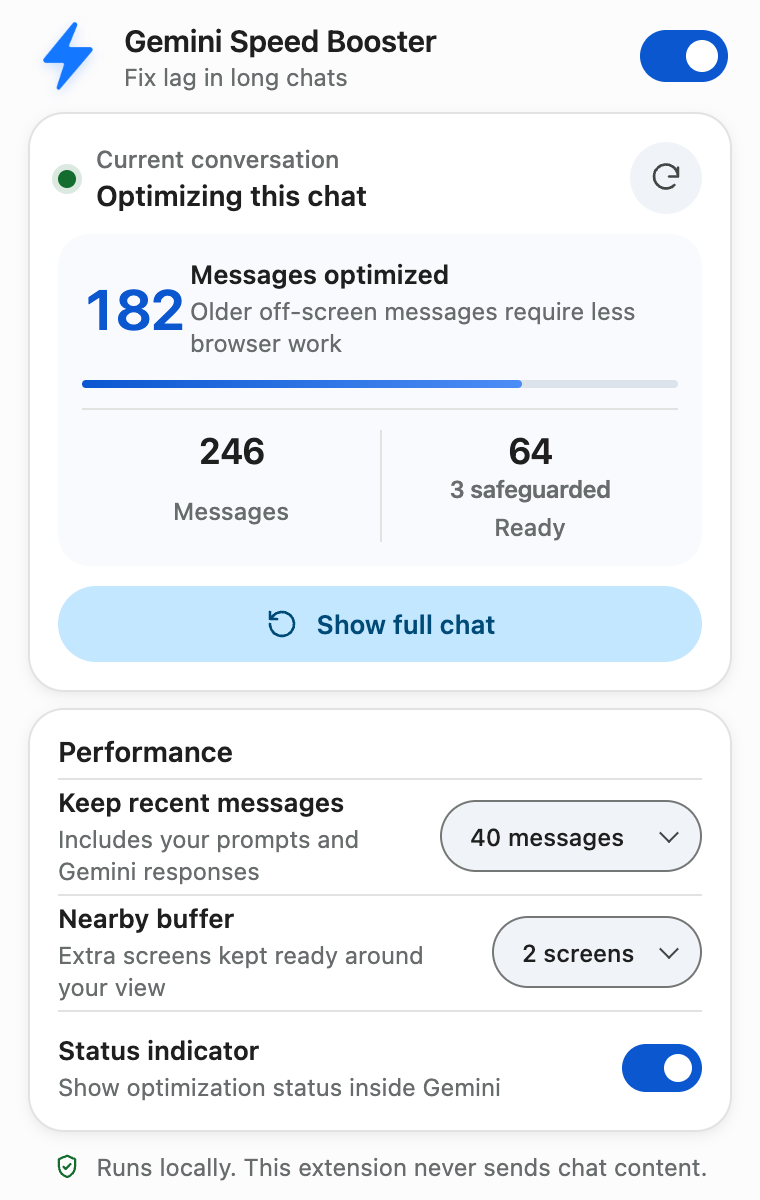
- Enable optimizationUse the switch at the top right. Start with the default performance settings while you compare the same conversation.
- Compare typing and scrolling“Optimizing this chat” means older off-screen messages are being optimized. “Ready” can mean nothing needs optimizing yet. Wait until Gemini has finished answering, then repeat your baseline actions.
- Restore the full viewClick Show full chat below the message counts. The status changes to “Full chat shown.” To resume optimization, click the circular-arrow Rescan this chat button beside the status.
For desktop Chrome · Keeps your messages intact · Does not speed up AI answer generation
What it can and cannot change
The extension changes how older off-screen content is rendered. It does not delete, rewrite or summarize your messages, and it does not upload or store chat content. Its store listing describes these behaviors.
It cannot increase Gemini’s context window, bypass usage limits, resolve server outages or speed up answer generation. A fresh chat can help you compare interface responsiveness, but it also changes the conversation context; it is not an equivalent continuation of your original thread.
If Gemini still feels slow
Write down whether the issue affects typing, scrolling or waiting for replies; whether it happens in one conversation or many; and whether other sites are affected. Include your Chrome and extension versions when reporting the problem. These details are more useful than a general “Gemini is slow” report.
If the page behaves unexpectedly with Speed Booster enabled, restore the full chat or disable the extension. Use the developer contact on its store listing to report the issue. Describe the symptoms without sharing private conversation text.
Try it on a long Gemini chat
Compare typing and scrolling on your own conversation, with a full-chat restoration option.
Get Gemini Speed BoosterDesktop Chrome · Improves browser responsiveness, not AI generation speed